Vehicle Routing Quick Start Guide
This guide walks you through the process of creating a Vehicle Routing optimization service with Timefold's constraint solving Artificial Intelligence (AI). It builds on the service module: you define the planning model and its API, and Timefold Solver takes care of the rest.
|
Check out our off-the-shelf model for Field Service Routing (REST API). It goes beyond basic vehicle routing and supports additional constraints such as priorities, skills, fairness and more. |
What you will build
You will build an optimization service that solves a Vehicle Routing Problem (VRP) with capacities and time windows:
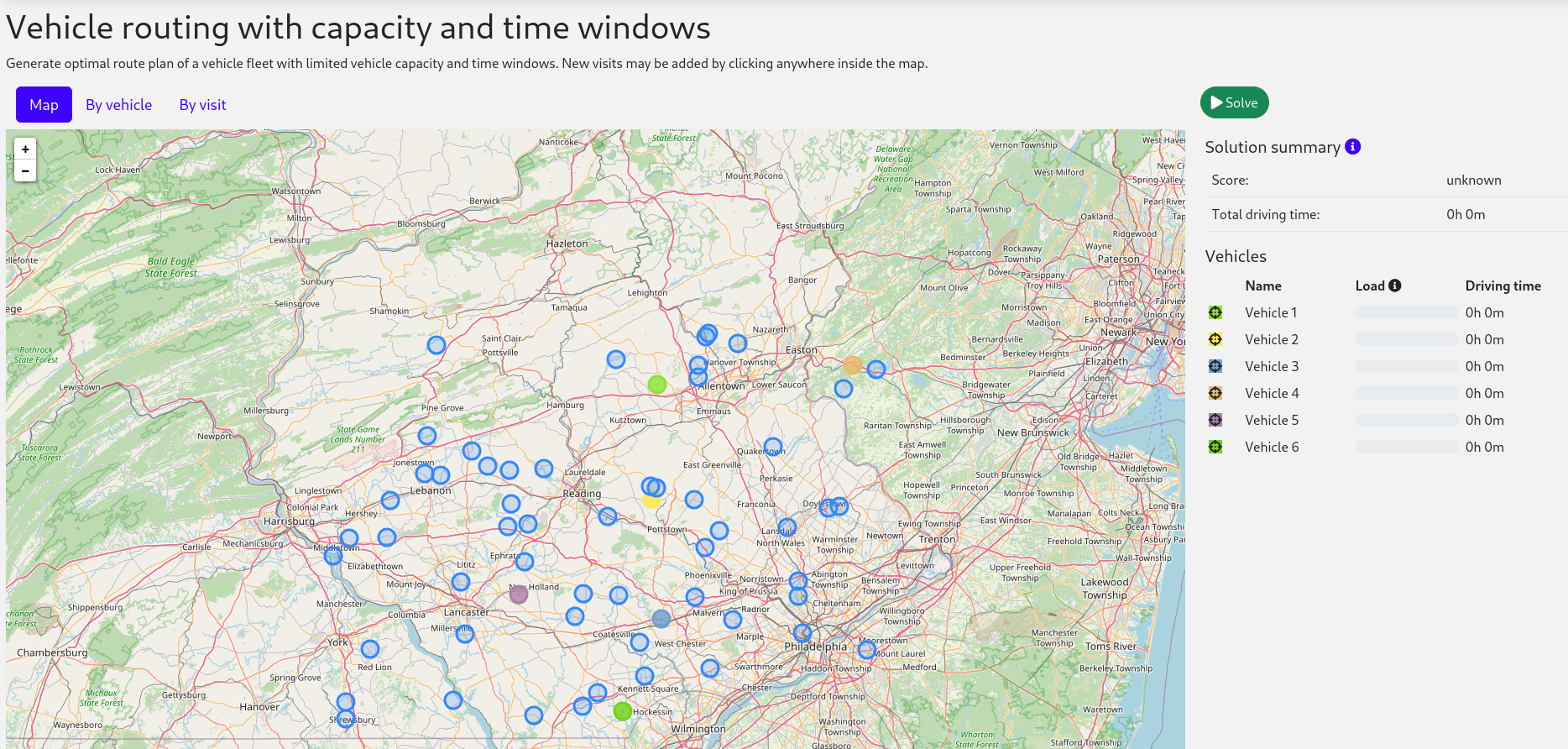
Each vehicle leaves its own home location at a set time, drives a route of visits, and returns home.
Your service will assign Visit instances to Vehicle instances automatically
by using AI to adhere to hard, medium and soft constraints:
-
The demand of the visits on a route cannot exceed the capacity of the vehicle.
-
A visit must be serviced before the end of its time window. A vehicle that arrives early waits.
-
As many visits as possible should be assigned to a vehicle. A visit that fits on no route is left unassigned rather than forced onto one.
-
The less total travel time, the better.
Mathematically speaking, VRP is an NP-hard problem. This means it is difficult to scale. Simply brute force iterating through all possible combinations takes millions of years for a non-trivial dataset, even on a supercomputer. Luckily, AI constraint solvers such as Timefold Solver have advanced algorithms that deliver a near-optimal solution in a reasonable amount of time.
Solution source code
Follow the instructions in the next sections to create the application step by step (recommended).
Alternatively, you can also skip right to the completed example:
-
Clone the Git repository:
$ git clone https://github.com/TimefoldAI/timefold-quickstartsor download an archive.
-
Find the solution in the
use-cases/vehicle-routingdirectory and run it (see its README file). The complete example also includes a web UI, demo datasets, input validation, metrics and a recommendation endpoint.
Prerequisites
To complete this guide, you need:
-
Tools
-
JDK 21 or higher
-
Maven
-
An IDE of your choice (IntelliJ IDEA, VSCode, …)
-
-
Knowledge
-
Java (Basic)
-
Quarkus (Basic)
-
If this is your first service, consider doing the Getting started: building a service guide first. It introduces the service module with a simpler model.
1. The build file and the dependencies
Create a Maven file that uses the service parent POM
and depends on timefold-solver-service-with-maps.
That dependency adds the map service, which provides the driving times between locations.
Your pom.xml file has the following content:
<?xml version="1.0" encoding="UTF-8"?>
<project xmlns="http://maven.apache.org/POM/4.0.0" xmlns:xsi="http://www.w3.org/2001/XMLSchema-instance"
         xsi:schemaLocation="http://maven.apache.org/POM/4.0.0 https://maven.apache.org/xsd/maven-4.0.0.xsd">
  <modelVersion>4.0.0</modelVersion>

  <parent>
    <groupId>ai.timefold.solver</groupId>
    <artifactId>timefold-solver-service-parent</artifactId>
    <version>SNAPSHOT</version>
  </parent>

  <groupId>org.acme</groupId>
  <artifactId>vehicle-routing</artifactId>
  <version>${revision}</version>

  <properties>
    <revision>1.0.0-SNAPSHOT</revision>
    <maven.compiler.release>21</maven.compiler.release>
  </properties>

  <dependencies>
    <dependency>
      <groupId>ai.timefold.solver</groupId>
      <artifactId>timefold-solver-service-with-maps</artifactId>
    </dependency>

    <dependency>
      <groupId>ai.timefold.solver</groupId>
      <artifactId>timefold-solver-service-maps-service-test</artifactId>
      <scope>test</scope>
    </dependency>
  </dependencies>
</project>
The parent POM brings in Quarkus, the REST layer, the OpenAPI tooling and the usual test libraries, so you do not need to declare them yourself.
2. Model the domain objects
Your goal is to assign each visit to a vehicle, in the order that vehicle services them. You will create these classes:
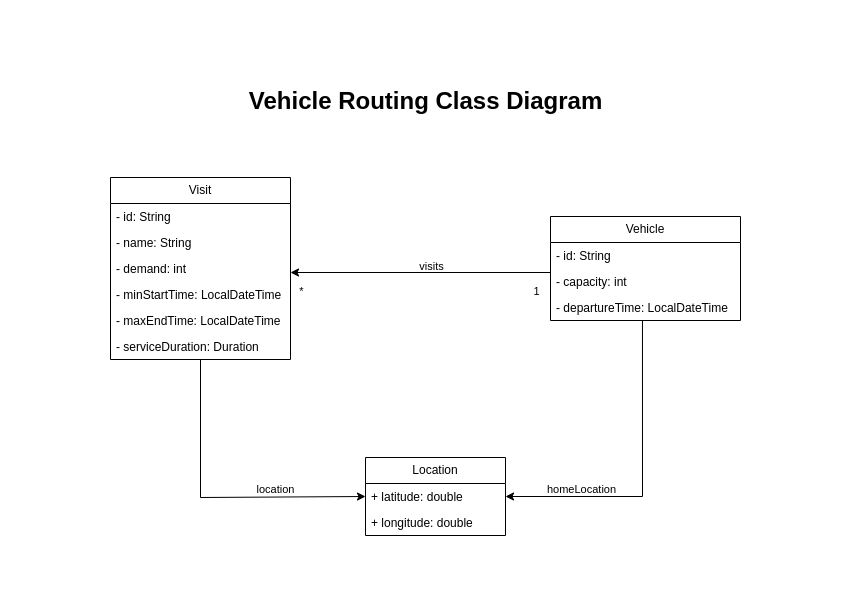
2.1. Location
Every location in the model, whether a vehicle’s home location or a visit’s destination,
is an ai.timefold.solver.service.maps.api.model.Location.
This class comes with the timefold-solver-service-with-maps dependency, so you do not create it yourself.
A Location holds a latitude and a longitude.
Its getTravelTimeTo(Location) method returns the driving time to another location.
That driving time comes from a travel time matrix that the map service builds before solving starts.
You never compute distances in your own code.
2.2. Vehicle
Vehicle has a route of visits to make.
Each vehicle has a specific departure time and starting location.
It returns to its home location after completing the route and has a maximum capacity that must not be exceeded.
During solving, Timefold Solver updates the visits field of the Vehicle class to assign a list of visits.
Because Timefold Solver changes this field, Vehicle is a planning entity:
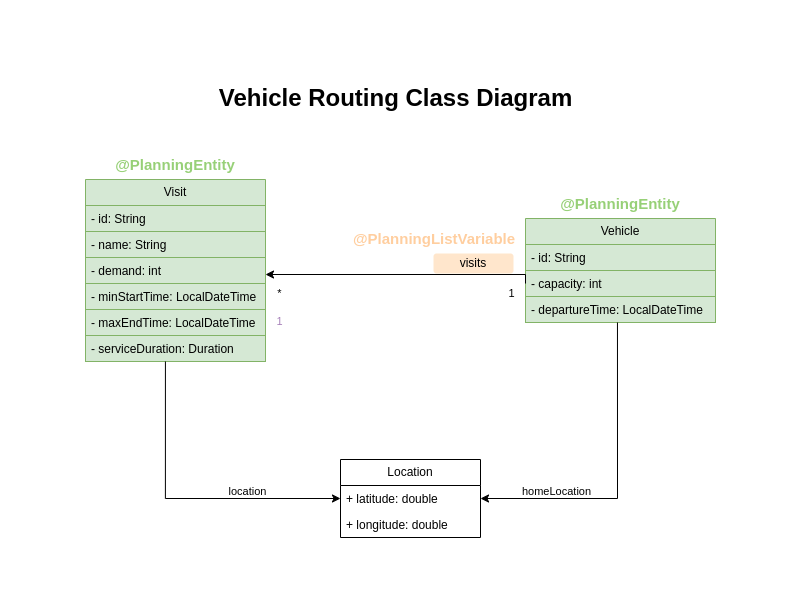
Based on the diagram, the visits field is a genuine variable that changes during the solving process.
To ensure that Timefold Solver recognizes it as a sequence of connected variables,
the field must have an @PlanningListVariable annotation indicating that the solver can distribute a subset of the
available visits to it.
The objective is to create an ordered route for each vehicle.
allowsUnassignedValues = true lets the solver leave a visit off every route.
When the fleet cannot service every visit, for example because it lacks capacity, the solver still produces a plan.
The plan leaves out the visits that do not fit, instead of breaking a hard constraint to squeeze them in.
Create the src/main/java/org/acme/vehiclerouting/domain/Vehicle.java class:
package org.acme.vehiclerouting.domain;

import java.time.OffsetDateTime;
import java.util.ArrayList;
import java.util.List;
import java.util.Objects;

import ai.timefold.solver.core.api.domain.common.PlanningId;
import ai.timefold.solver.core.api.domain.entity.PlanningEntity;
import ai.timefold.solver.core.api.domain.variable.PlanningListVariable;
import ai.timefold.solver.service.maps.api.model.Location;

@PlanningEntity
public class Vehicle {

    @PlanningId
    private String id;
    private int capacity;
    private Location homeLocation;
    private OffsetDateTime departureTime;

    /**
     * The route of this vehicle: the visits it services, in the order it services them. The
     * assignment <em>is</em> this list, so a visit that appears in no vehicle's list is unassigned.
     */
    @PlanningListVariable(allowsUnassignedValues = true)
    private List<Visit> visits;

    public Vehicle() {
    }

    public Vehicle(String id, int capacity, Location homeLocation, OffsetDateTime departureTime) {
        this.id = id;
        this.capacity = capacity;
        this.homeLocation = homeLocation;
        this.departureTime = departureTime;
        this.visits = new ArrayList<>();
    }

    /**
     * @return the demand of every visit on the route added up; 0 while it is not computed yet
     */
    public int getTotalDemand() {
        if (visits.isEmpty()) {
            return 0;
        }

        Visit lastVisit = visits.get(visits.size() - 1);
        Integer cumulativeDemand = lastVisit.getCumulativeDemand();
        return cumulativeDemand == null ? 0 : cumulativeDemand;
    }

    /**
     * @return the driving time of the whole route, home location to home location, in seconds;
     *         0 while it is not computed yet
     */
    public long getTotalDrivingTimeSeconds() {
        if (visits.isEmpty()) {
            return 0;
        }

        Visit lastVisit = visits.get(visits.size() - 1);
        Long cumulativeDrivingTime = lastVisit.getCumulativeDrivingTimeSeconds();
        if (cumulativeDrivingTime == null) {
            return 0;
        }
        return cumulativeDrivingTime + lastVisit.getLocation().getTravelTimeTo(homeLocation).seconds();
    }

    /**
     * @return the time this vehicle is back at its home location, or its departure time when it has
     *         no visits to make; null while the timings of its last visit are not computed yet
     */
    public OffsetDateTime arrivalTime() {
        if (visits.isEmpty()) {
            return departureTime;
        }

        Visit lastVisit = visits.get(visits.size() - 1);
        OffsetDateTime lastDepartureTime = lastVisit.getDepartureTime();
        if (lastDepartureTime == null) {
            return null;
        }
        return lastDepartureTime.plusSeconds(lastVisit.getLocation().getTravelTimeTo(homeLocation).seconds());
    }

    // Getters, setters, equals() and hashCode() (based on id) excluded

    @Override
    public String toString() {
        return id;
    }
}
The Vehicle class has an @PlanningEntity annotation,
so Timefold Solver knows that this class changes during solving because it contains one or more planning variables.
Notice the toString() method keeps the output short,
so it is easier to read Timefold Solver’s DEBUG or TRACE log.
|
Determining the |
2.3. Visit
The Visit class represents a delivery that needs to be made by vehicles.
A visit includes a destination location, a delivery time window represented by [minStartTime, maxEndTime],
a demand that needs to be fulfilled by the vehicle, and a service duration time.
The Visit class has an @PlanningEntity annotation
but no genuine variables, so it is called a shadow entity.
Create the src/main/java/org/acme/vehiclerouting/domain/Visit.java class:
package org.acme.vehiclerouting.domain;

import java.time.Duration;
import java.time.OffsetDateTime;
import java.time.temporal.ChronoUnit;
import java.util.Objects;

import ai.timefold.solver.core.api.domain.common.PlanningId;
import ai.timefold.solver.core.api.domain.entity.PlanningEntity;
import ai.timefold.solver.core.api.domain.variable.InverseRelationShadowVariable;
import ai.timefold.solver.core.api.domain.variable.PreviousElementShadowVariable;
import ai.timefold.solver.core.api.domain.variable.ShadowSources;
import ai.timefold.solver.core.api.domain.variable.ShadowVariable;
import ai.timefold.solver.service.maps.api.model.Location;

@PlanningEntity
public class Visit {

    @PlanningId
    private String id;
    private String name;
    private Location location;
    private int demand;
    private OffsetDateTime minStartTime;
    private OffsetDateTime maxEndTime;
    private Duration serviceDuration;

    @InverseRelationShadowVariable(sourceVariableName = "visits")
    private Vehicle vehicle;
    @PreviousElementShadowVariable(sourceVariableName = "visits")
    private Visit previousVisit;
    @ShadowVariable(supplierName = "timingsSupplier")
    private Timings timings;
    @ShadowVariable(supplierName = "cumulativeDemandSupplier")
    private Integer cumulativeDemand;

    public Visit() {
    }

    public Visit(String id, String name, Location location, int demand,
            OffsetDateTime minStartTime, OffsetDateTime maxEndTime, Duration serviceDuration) {
        this.id = id;
        this.name = name;
        this.location = location;
        this.demand = demand;
        this.minStartTime = minStartTime;
        this.maxEndTime = maxEndTime;
        this.serviceDuration = serviceDuration;
    }

    /**
     * Computes the arrival, start service and departure time, and the driving time so far, in one go:
     * they are all derived from the same predecessor's timings, so a single supplier keeps them consistent.
     *
     * @return null while this visit is unassigned or its predecessor is not timed yet
     */
    @ShadowSources({ "vehicle", "previousVisit.timings" })
    public Timings timingsSupplier() {
        if (previousVisit == null && vehicle == null) {
            return null;
        }
        OffsetDateTime previousDepartureTime =
                previousVisit == null ? vehicle.getDepartureTime() : previousVisit.getDepartureTime();
        if (previousDepartureTime == null) {
            return null;
        }
        long drivingTimeSeconds = getDrivingTimeSecondsFromPreviousStandstill();
        long previousCumulativeDrivingTimeSeconds =
                previousVisit == null ? 0 : previousVisit.getCumulativeDrivingTimeSeconds();
        var arrivalTime = previousDepartureTime.plusSeconds(drivingTimeSeconds);
        var startServiceTime = arrivalTime.isBefore(minStartTime) ? minStartTime : arrivalTime;
        return new Timings(arrivalTime, startServiceTime, startServiceTime.plus(serviceDuration),
                previousCumulativeDrivingTimeSeconds + drivingTimeSeconds);
    }

    /**
     * @return the demand of this visit and every visit before it on the route added up,
     *         or null while this visit is unassigned
     */
    @ShadowSources({ "vehicle", "previousVisit.cumulativeDemand" })
    public Integer cumulativeDemandSupplier() {
        if (vehicle == null) {
            return null;
        }
        if (previousVisit == null) {
            return demand;
        }
        Integer previousCumulativeDemand = previousVisit.getCumulativeDemand();
        return previousCumulativeDemand == null ? null : previousCumulativeDemand + demand;
    }

    public OffsetDateTime getArrivalTime() {
        return timings == null ? null : timings.arrivalTime();
    }

    public OffsetDateTime getStartServiceTime() {
        return timings == null ? null : timings.startServiceTime();
    }

    public OffsetDateTime getDepartureTime() {
        return timings == null ? null : timings.departureTime();
    }

    /**
     * @return the driving time from the vehicle's home location up to this visit, in seconds,
     *         or null while this visit is not timed yet
     */
    public Long getCumulativeDrivingTimeSeconds() {
        return timings == null ? null : timings.cumulativeDrivingTimeSeconds();
    }

    /**
     * @return the demand of this visit and every visit before it on the route added up,
     *         or null while this visit is unassigned
     */
    public Integer getCumulativeDemand() {
        return cumulativeDemand;
    }

    public boolean isAssigned() {
        return vehicle != null;
    }

    public boolean isServiceFinishedAfterMaxEndTime() {
        var serviceStart = getStartServiceTime();
        return serviceStart != null
                && serviceStart.plus(serviceDuration).isAfter(maxEndTime);
    }

    public long getServiceFinishedDelayInMinutes() {
        var departureTime = getDepartureTime();
        if (departureTime == null) {
            return 0;
        }
        return roundDurationToNextOrEqualMinutes(Duration.between(maxEndTime, departureTime));
    }

    private static long roundDurationToNextOrEqualMinutes(Duration duration) {
        var remainder = duration.minus(duration.truncatedTo(ChronoUnit.MINUTES));
        var minutes = duration.toMinutes();
        if (remainder.equals(Duration.ZERO)) {
            return minutes;
        }
        return minutes + 1;
    }

    public long getDrivingTimeSecondsFromPreviousStandstill() {
        if (vehicle == null) {
            throw new IllegalStateException(
                    "This method must not be called when the shadow variables are not initialized yet.");
        }
        if (previousVisit == null) {
            return vehicle.getHomeLocation().getTravelTimeTo(location).seconds();
        }
        return previousVisit.getLocation().getTravelTimeTo(location).seconds();
    }

    /**
     * @return the same driving time as {@link #getDrivingTimeSecondsFromPreviousStandstill()}, but
     *         null instead of an exception while this visit is still unassigned
     */
    public Long getDrivingTimeSecondsFromPreviousStandstillOrNull() {
        if (vehicle == null) {
            return null;
        }
        return getDrivingTimeSecondsFromPreviousStandstill();
    }

    // Getters, setters, equals() and hashCode() (based on id) excluded

    @Override
    public String toString() {
        return id;
    }

    /**
     * The times at which this visit is serviced, all derived from the route this visit is in.
     *
     * @param cumulativeDrivingTimeSeconds the driving time from the vehicle's home location up to this visit
     */
    public record Timings(OffsetDateTime arrivalTime, OffsetDateTime startServiceTime,
            OffsetDateTime departureTime, long cumulativeDrivingTimeSeconds) {
    }
}
The fields vehicle, previousVisit, timings and cumulativeDemand are
shadow variables.
Timefold Solver updates them automatically whenever the visits list of a vehicle changes.
The field vehicle has an @InverseRelationShadowVariable annotation,
creating a bi-directional relationship with the Vehicle.
It holds a reference to the Vehicle where the visit is scheduled, or null if the visit is unassigned.
Let’s say the visit Ann was scheduled to the vehicle V1 during the solving process.
The field then holds a reference to V1.
The field previousVisit is annotated with @PreviousElementShadowVariable.
The solver will update this field with a reference of the visit preceding the current visit instance.
Assuming that vehicle V1 is assigned the visits of Ann, Beth, and Carl,
the previousVisit field will be filled with Ann for the visit of Beth.
@NextElementShadowVariable also exists, which can be used to get a reference to the successor element.
|
The timings field is a custom shadow variable.
@ShadowVariable(supplierName = "timingsSupplier") tells Timefold Solver to compute it with the timingsSupplier() method.
@ShadowSources on that method lists what the result depends on: the vehicle of this visit and the timings of the previous visit.
Whenever one of those changes, Timefold Solver recalculates the timings of this visit, and in turn those of every visit after it on the route.
The arrival time, the start of service and the departure time all derive from the departure time of the previous stop.
So the Timings record computes them together, in a single shadow variable
(see updating multiple fields at once).
A vehicle that arrives before minStartTime waits, so servicing starts at minStartTime rather than at the arrival time.
Timings also keeps the cumulative driving time: the driving time from the vehicle’s home location up to this visit.
It adds the driving time from the previous stop to the cumulative driving time of the previous visit,
so it builds on the same previousVisit.timings source.
The cumulativeDemand field is a second custom shadow variable, computed by cumulativeDemandSupplier().
It holds the demand of this visit plus the cumulative demand of the previous visit,
so it depends on vehicle and previousVisit.cumulativeDemand.
The demand does not depend on the timings, so it is a separate shadow variable:
a change that only affects the timings, such as a different departure time, does not recalculate it.
Because every visit carries these running totals, the last visit on a route holds the totals of the whole route.
That is why Vehicle.getTotalDemand() and Vehicle.getTotalDrivingTimeSeconds() only look at the last visit
instead of looping over the entire route.
getTotalDrivingTimeSeconds() still adds the drive from the last visit back to the home location.
3. Define the constraints and calculate the score
A score represents the quality of a specific solution. The higher the better. Timefold Solver looks for the best solution, which is the solution with the highest score found in the available time. It might be the optimal solution.
Because this use case has hard, medium and soft constraints,
use the HardMediumSoftScore class to represent the score:
-
Hard constraints must not be broken. For example: The vehicle capacity must not be exceeded.
-
Medium constraints should not be broken. For example: As many visits as possible should be assigned to a vehicle.
-
Soft constraints should not be broken either, but are only considered once the medium constraints are as good as they get. For example: The sum total of travel time.
Hard constraints are weighted against other hard constraints. Medium and soft constraints are weighted too, against other constraints of the same level. Hard constraints always outweigh medium constraints, and medium constraints always outweigh soft constraints, regardless of their respective weights.
The medium level is what makes unassigned visits work. Assigning a visit is always worth more than any saving in travel time, but never worth breaking a hard constraint. So the solver only leaves a visit unassigned when it cannot fit on any route.
3.1. Constraint names
The service module exposes constraints through its REST API, for example in the score analysis and in the constraint weight overrides. To reference them consistently, keep the constraint names in one place.
Create the src/main/java/org/acme/vehiclerouting/domain/VehicleRoutePlanConstraintProperties.java class:
package org.acme.vehiclerouting.domain;

public final class VehicleRoutePlanConstraintProperties {

    public static final String VEHICLE_CAPACITY = "Vehicle capacity";
    public static final String SERVICE_FINISHED_AFTER_MAX_END_TIME = "Service finished after max end time";

    public static final String MAXIMIZE_VISITS_ASSIGNED = "Maximize visits assigned";

    public static final String MINIMIZE_TRAVEL_TIME = "Minimize travel time";

    private VehicleRoutePlanConstraintProperties() {
    }
}
Constraints are also organized in groups, which the Timefold Platform uses to present them.
Create the src/main/java/org/acme/vehiclerouting/solver/VehicleRoutePlanConstraintGroup.java class:
package org.acme.vehiclerouting.solver;

import ai.timefold.solver.service.definition.api.description.ConstraintGroupInfo;

public final class VehicleRoutePlanConstraintGroup {

    public static final ConstraintGroupInfo VEHICLE_CAPACITY = new ConstraintGroupInfo("vehicleCapacity",
            "Vehicle capacity",
            "Keep the total demand of the visits on a vehicle's route within the capacity that vehicle has.",
            "IconTruckLoading",
            new String[] { "vehicle capacity" });

    public static final ConstraintGroupInfo TIME_WINDOWS = new ConstraintGroupInfo("timeWindows",
            "Time windows",
            "Service every visit inside the time window it accepts a vehicle in.",
            "IconClock",
            new String[] { "time windows" });

    public static final ConstraintGroupInfo VISIT_ASSIGNMENT = new ConstraintGroupInfo("visitAssignment",
            "Visit assignment",
            "Get as many visits as possible onto a vehicle's route, rather than leaving them unserviced.",
            "IconMapPin",
            new String[] { "visit assignment" });

    public static final ConstraintGroupInfo TRAVEL_TIME = new ConstraintGroupInfo("travelTime",
            "Travel time",
            "Keep the fleet on the road for as little time as possible.",
            "IconRoute",
            new String[] { "travel time" });

    private VehicleRoutePlanConstraintGroup() {
    }
}
3.2. Constraint justifications
Every constraint match can carry a justification: an object that explains why the constraint matched. The service module returns these justifications in the score analysis, so a user of your service can see exactly which vehicle is overloaded or which visit is late.
Each justification is a record that implements ModelConstraintJustification.
Create the src/main/java/org/acme/vehiclerouting/domain/justification/VehicleRoutePlanJustification.java interface:
package org.acme.vehiclerouting.domain.justification;

import ai.timefold.solver.service.definition.api.ModelConstraintJustification;

import org.acme.vehiclerouting.domain.Vehicle;

public interface VehicleRoutePlanJustification extends ModelConstraintJustification {

    String getDescription();

    default String description() {
        return getDescription();
    }

    record VehicleCapacityJustification(String vehicle, int capacity, int totalDemand, int excessDemand)
            implements VehicleRoutePlanJustification {

        public static VehicleCapacityJustification of(Vehicle vehicle) {
            return new VehicleCapacityJustification(vehicle.getId(), vehicle.getCapacity(), vehicle.getTotalDemand(),
                    vehicle.getTotalDemand() - vehicle.getCapacity());
        }

        @Override
        public String getDescription() {
            return "Vehicle '%s' carries a demand of %d, which is %d over its capacity of %d."
                    .formatted(vehicle, totalDemand, excessDemand, capacity);
        }
    }

    // ServiceFinishedAfterMaxEndTimeJustification, VisitNotAssignedJustification
    // and TravelTimeJustification follow the same pattern and are excluded
}
As with the API classes, the complete quickstart annotates the justifications with @Schema
so they are documented in the generated OpenAPI specification.
There, the interface also lists every justification record in @Schema(oneOf = …):
a record that is not listed does not show up in the specification.
See the quickstart source code for the other three justification records.
3.3. The constraint provider
To calculate the score, create a VehicleRoutePlanConstraintProvider class
to perform incremental score calculation.
It uses Timefold Solver’s Constraint Streams API
which is inspired by Java Streams and SQL.
Each constraint is registered with a ConstraintInfo, which gives it a name, a description and a group.
The service module uses this information to describe the constraints of your model in its REST API.
Create the src/main/java/org/acme/vehiclerouting/solver/VehicleRoutePlanConstraintProvider.java class:
package org.acme.vehiclerouting.solver;

import ai.timefold.solver.core.api.score.HardMediumSoftScore;
import ai.timefold.solver.core.api.score.stream.Constraint;
import ai.timefold.solver.core.api.score.stream.ConstraintFactory;
import ai.timefold.solver.core.api.score.stream.ConstraintProvider;
import ai.timefold.solver.service.definition.api.description.ConstraintInfo;

import org.acme.vehiclerouting.domain.Vehicle;
import org.acme.vehiclerouting.domain.VehicleRoutePlanConstraintProperties;
import org.acme.vehiclerouting.domain.Visit;
import org.acme.vehiclerouting.domain.justification.VehicleRoutePlanJustification.ServiceFinishedAfterMaxEndTimeJustification;
import org.acme.vehiclerouting.domain.justification.VehicleRoutePlanJustification.TravelTimeJustification;
import org.acme.vehiclerouting.domain.justification.VehicleRoutePlanJustification.VehicleCapacityJustification;
import org.acme.vehiclerouting.domain.justification.VehicleRoutePlanJustification.VisitNotAssignedJustification;

public class VehicleRoutePlanConstraintProvider implements ConstraintProvider {

    @Override
    public Constraint[] defineConstraints(ConstraintFactory factory) {
        return new Constraint[] {
                // Hard constraints
                vehicleCapacity(factory),
                serviceFinishedAfterMaxEndTime(factory),

                // Medium constraints
                maximizeVisitsAssigned(factory),

                // Soft constraints
                minimizeTravelTime(factory)
        };
    }

    public Constraint vehicleCapacity(ConstraintFactory factory) {
        return factory.forEach(Vehicle.class)
                .filter(vehicle -> vehicle.getTotalDemand() > vehicle.getCapacity())
                .penalize(HardMediumSoftScore.ONE_HARD,
                        vehicle -> vehicle.getTotalDemand() - vehicle.getCapacity())
                .justifyWith((vehicle, score) -> VehicleCapacityJustification.of(vehicle))
                .asConstraint(new ConstraintInfo(VehicleRoutePlanConstraintProperties.VEHICLE_CAPACITY,
                        VehicleRoutePlanConstraintProperties.VEHICLE_CAPACITY,
                        "The total demand of all visits assigned to a vehicle must not exceed its capacity.",
                        VehicleRoutePlanConstraintGroup.VEHICLE_CAPACITY));
    }

    public Constraint serviceFinishedAfterMaxEndTime(ConstraintFactory factory) {
        return factory.forEach(Visit.class)
                .filter(Visit::isServiceFinishedAfterMaxEndTime)
                .penalize(HardMediumSoftScore.ONE_HARD,
                        Visit::getServiceFinishedDelayInMinutes)
                .justifyWith((visit, score) -> ServiceFinishedAfterMaxEndTimeJustification.of(visit))
                .asConstraint(
                        new ConstraintInfo(VehicleRoutePlanConstraintProperties.SERVICE_FINISHED_AFTER_MAX_END_TIME,
                                VehicleRoutePlanConstraintProperties.SERVICE_FINISHED_AFTER_MAX_END_TIME,
                                "A visit must be serviced before its maximum end time.",
                                VehicleRoutePlanConstraintGroup.TIME_WINDOWS));
    }

    public Constraint maximizeVisitsAssigned(ConstraintFactory factory) {
        return factory.forEachIncludingUnassigned(Visit.class)
                .filter(visit -> visit.getVehicle() == null)
                .penalize(HardMediumSoftScore.ONE_MEDIUM, visit -> visit.getServiceDuration().toMinutes())
                .justifyWith((visit, score) -> VisitNotAssignedJustification.of(visit))
                .asConstraint(new ConstraintInfo(VehicleRoutePlanConstraintProperties.MAXIMIZE_VISITS_ASSIGNED,
                        VehicleRoutePlanConstraintProperties.MAXIMIZE_VISITS_ASSIGNED,
                        "As many visits as possible should be assigned to a vehicle.",
                        VehicleRoutePlanConstraintGroup.VISIT_ASSIGNMENT));
    }

    public Constraint minimizeTravelTime(ConstraintFactory factory) {
        return factory.forEach(Vehicle.class)
                .penalize(HardMediumSoftScore.ONE_SOFT,
                        Vehicle::getTotalDrivingTimeSeconds)
                .justifyWith((vehicle, score) -> TravelTimeJustification.of(vehicle))
                .asConstraint(new ConstraintInfo(VehicleRoutePlanConstraintProperties.MINIMIZE_TRAVEL_TIME,
                        VehicleRoutePlanConstraintProperties.MINIMIZE_TRAVEL_TIME,
                        "Minimize the total travel time of all vehicles.",
                        VehicleRoutePlanConstraintGroup.TRAVEL_TIME));
    }
}
Notice that maximizeVisitsAssigned starts from forEachIncludingUnassigned(Visit.class).
A plain forEach(Visit.class) skips visits that are not on any route,
which are exactly the visits this constraint needs to penalize.
The penalty is the service duration of the unassigned visit,
so the solver prefers to leave out a short visit rather than a long one.
4. Gather the domain objects in a planning solution
A VehicleRoutePlan wraps all Vehicle and Visit instances of a single dataset.
Furthermore, because it contains all vehicles and visits, each with a specific planning variable state,
it is a planning solution
and it has a score:
-
If it breaks hard constraints, then it is an infeasible solution, for example, a solution with the score
-2hard/0medium/-3soft. -
If it adheres to all hard constraints, then it is a feasible solution, for example, a solution with the score
0hard/-30medium/-7soft. -
If it is feasible and every visit is assigned, the medium score is
0, for example,0hard/0medium/-7soft.
VehicleRoutePlan implements LocationsAwareSolverModel<HardMediumSoftScore>.
This interface extends the service module’s SolverModel
and tells the map service which locations to include in the travel time matrix.
Create the src/main/java/org/acme/vehiclerouting/domain/VehicleRoutePlan.java class:
package org.acme.vehiclerouting.domain;

import java.util.List;
import java.util.Optional;
import java.util.stream.Stream;

import ai.timefold.solver.core.api.domain.solution.ConstraintWeightOverrides;
import ai.timefold.solver.core.api.domain.solution.PlanningEntityCollectionProperty;
import ai.timefold.solver.core.api.domain.solution.PlanningScore;
import ai.timefold.solver.core.api.domain.solution.PlanningSolution;
import ai.timefold.solver.core.api.domain.valuerange.ValueRangeProvider;
import ai.timefold.solver.core.api.score.HardMediumSoftScore;
import ai.timefold.solver.service.maps.api.model.Location;
import ai.timefold.solver.service.maps.service.integration.api.LocationsAwareSolverModel;

@PlanningSolution
public class VehicleRoutePlan implements LocationsAwareSolverModel<HardMediumSoftScore> {

    @PlanningEntityCollectionProperty
    private List<Vehicle> vehicles;

    @PlanningEntityCollectionProperty
    @ValueRangeProvider
    private List<Visit> visits;

    @PlanningScore
    private HardMediumSoftScore score;

    private ConstraintWeightOverrides<HardMediumSoftScore> constraintWeightOverrides = ConstraintWeightOverrides.none();

    // Reported back by the map service: the locations it could not resolve, if any.
    private List<Location> locationsNotInMap = List.of();

    public VehicleRoutePlan() {
    }

    public VehicleRoutePlan(List<Vehicle> vehicles, List<Visit> visits) {
        this.vehicles = vehicles;
        this.visits = visits;
    }

    public long getTotalDrivingTimeSeconds() {
        return vehicles == null ? 0 : vehicles.stream().mapToLong(Vehicle::getTotalDrivingTimeSeconds).sum();
    }

    // ── LocationsAwareSolverModel ──

    @Override
    public List<Location> getLocations() {
        if (vehicles == null || visits == null) {
            return List.of();
        }
        return Stream.concat(
                vehicles.stream().map(Vehicle::getHomeLocation),
                visits.stream().map(Visit::getLocation)).toList();
    }

    // Every solve builds its own one-off matrix rather than reusing a named, pre-built one.
    @Override
    public Optional<String> getLocationSetName() {
        return Optional.empty();
    }

    @Override
    public void setLocationsNotInMap(List<Location> locationsNotInMap) {
        this.locationsNotInMap = locationsNotInMap == null ? List.of() : locationsNotInMap;
    }

    @Override
    public List<Location> getLocationsNotInMap() {
        return locationsNotInMap;
    }

    @Override
    public ConstraintWeightOverrides<HardMediumSoftScore> getConstraintWeightOverrides() {
        return constraintWeightOverrides;
    }

    // Other getters and setters excluded
}
The VehicleRoutePlan class has an @PlanningSolution annotation,
so Timefold Solver knows that this class contains all of the input and output data.
Specifically, these classes are the input of the problem:
-
The
vehiclesfield with all vehicles-
This is a list of planning entities, because they change during solving.
-
For each
Vehicle:-
The value of the
visitsis typically still empty, so unassigned. It is a planning variable. -
The other fields, such as
capacity,homeLocationanddepartureTime, are filled in. These fields are problem properties.
-
-
-
The
visitsfield with all visits-
This is a list of planning entities, because they change during solving.
-
For each
Visit:-
The values of
vehicle,previousVisitandtimingsare typically stillnullfor a fresh solution. They are shadow variables. -
The other fields, such as
name,locationanddemand, are filled in. These fields are problem properties.
-
-
However, this class is also the output of the solution:
-
The
vehiclesfield for which eachVehicleinstance has itsvisitsfilled in after solving. -
The
scorefield that represents the quality of the output solution, for example,0hard/0medium/-5soft.
getConstraintWeightOverrides() is required by the SolverModel interface.
The model convertor fills it in
when a request overrides a constraint weight.
4.1. The value range providers
The visits field is a value range provider.
It holds the Visit instances which Timefold Solver can pick from to assign to the visits field of Vehicle instances.
The visits field has an @ValueRangeProvider annotation to connect the @PlanningListVariable with the @ValueRangeProvider,
by matching the type of the planning list variable with the type returned by the value range provider.
4.2. Driving times from the map service
A matrix of driving times between each pair of locations has to be available before the solver starts. You do not build that matrix yourself: the map service of the service module builds it.
Before every solve, the service module enriches the solver model.
Because VehicleRoutePlan implements LocationsAwareSolverModel, the map service is one of those enrichers:
-
getLocations()returns every location the matrix needs to cover: every vehicle’s home location plus every visit’s location. -
getLocationSetName()returns empty, so each solve builds its own one-off matrix rather than reusing a named, pre-built one. -
setLocationsNotInMap()lets the map service report back any locations it could not resolve, so the model retains that information instead of silently dropping it.
After that, Location.getTravelTimeTo(otherLocation) returns the driving time between any two of those locations.
Vehicle.getTotalDrivingTimeSeconds() and Visit.getDrivingTimeSecondsFromPreviousStandstill() both rely on it.
Two properties control how the matrix gets built:
timefold.platform.map-service.use-remote=false
timefold.platform.map-service.enable-fallback=true-
use-remoteswitches between the remote map service of the Timefold Platform, which uses real road-network driving times, and a local computation. -
enable-fallbackallows falling back to the local computation when the remote one is disabled or unavailable. The local computation estimates driving times from the great-circle (Haversine) distance.
Running locally, you use the local computation. When you deploy the model to the Timefold Platform, the maps service of the platform provides real road-network driving times without any change to your code.
5. Define the API of the service
The domain classes are built for the solver:
they hold object references, shadow variables and a travel time matrix.
The users of your service should not have to know about any of that.
So the service has its own API classes, and a
ModelConvertor translates between the two.
-
ModelInput: the problem a user submits. -
ModelOutput: the solution the service returns. -
ModelConfigOverrides: the settings a user can change per request, such as constraint weights.
|
In the complete quickstart, every class and field below also carries a MicroProfile OpenAPI To keep the listings short, this guide leaves the |
5.1. The input
In the input, a route is a list of visit IDs.
A new problem has empty routes, but a user can also submit an existing plan, for example to improve it further.
A visit that appears in no vehicle’s visitIds is unassigned.
Create the src/main/java/org/acme/vehiclerouting/dto/input/LocationInputDTO.java record:
package org.acme.vehiclerouting.dto.input;

public record LocationInputDTO(Double latitude, Double longitude) {
}
Create the src/main/java/org/acme/vehiclerouting/dto/input/VehicleInputDTO.java record:
package org.acme.vehiclerouting.dto.input;

import static java.util.Collections.emptyList;

import java.time.OffsetDateTime;
import java.util.List;

public record VehicleInputDTO(
        String id,
        Integer capacity,
        LocationInputDTO homeLocation,
        OffsetDateTime departureTime,
        // The visits on this vehicle's route, in order. Empty when the vehicle has no route yet.
        List<String> visitIds) {

    public VehicleInputDTO {
        visitIds = visitIds != null ? visitIds : emptyList();
    }

    public VehicleInputDTO withVisitIds(List<String> visitIds) {
        return new VehicleInputDTO(id, capacity, homeLocation, departureTime, visitIds);
    }
}
Create the src/main/java/org/acme/vehiclerouting/dto/input/VisitInputDTO.java record:
package org.acme.vehiclerouting.dto.input;

import java.time.OffsetDateTime;

public record VisitInputDTO(
        String id,
        String name,
        LocationInputDTO location,
        Integer demand,
        OffsetDateTime minStartTime,
        OffsetDateTime maxEndTime,
        Integer serviceDurationMinutes) {
}
Finally, the input itself wraps the vehicles and the visits and implements ModelInput.
Create the src/main/java/org/acme/vehiclerouting/dto/input/VehicleRoutePlanInput.java record:
package org.acme.vehiclerouting.dto.input;

import java.time.OffsetDateTime;
import java.util.List;

import ai.timefold.solver.service.definition.api.ModelInput;

public record VehicleRoutePlanInput(
        OffsetDateTime startDateTime,
        OffsetDateTime endDateTime,
        List<VehicleInputDTO> vehicles,
        List<VisitInputDTO> visits)
        implements
            ModelInput {

    public VehicleRoutePlanInput withVehicles(List<VehicleInputDTO> vehicles) {
        return new VehicleRoutePlanInput(startDateTime, endDateTime, vehicles, visits);
    }
}
All date-times are OffsetDateTime, so the JSON always carries an offset, for example 2026-02-10T07:30:00Z.
5.2. The configuration overrides
ModelConfigOverrides lists what a user can tune per request.
In this model, that is the weight of the Minimize travel time constraint.
@ConstraintReference links the field to that constraint.
A weight left unset (null) is not overridden, so the value from the configuration profile (or the constraint’s default) applies.
Read Model configuration overrides to learn more.
Create the src/main/java/org/acme/vehiclerouting/dto/input/VehicleRoutePlanConfigOverrides.java record:
package org.acme.vehiclerouting.dto.input;

import ai.timefold.solver.service.definition.api.ModelConfigOverrides;
import ai.timefold.solver.service.definition.api.domain.ConstraintReference;

import org.acme.vehiclerouting.domain.VehicleRoutePlanConstraintProperties;

import com.fasterxml.jackson.annotation.JsonInclude;

@JsonInclude(JsonInclude.Include.NON_NULL)
public record VehicleRoutePlanConfigOverrides(
        @ConstraintReference(VehicleRoutePlanConstraintProperties.MINIMIZE_TRAVEL_TIME) Long minimizeTravelTimeWeight)
        implements
            ModelConfigOverrides {

    // Required by the service module to generate the default configuration profile.
    public VehicleRoutePlanConfigOverrides() {
        this(null);
    }
}
5.3. The output
The output mirrors the input.
For each vehicle, it returns the route as a list of visit IDs, along with its total demand and driving time.
For each visit, it returns the vehicle that services it and when it does so.
The fields of an unassigned visit are null.
Create the src/main/java/org/acme/vehiclerouting/dto/output/VehicleOutputDTO.java record:
package org.acme.vehiclerouting.dto.output;

import java.time.OffsetDateTime;
import java.util.List;

import com.fasterxml.jackson.annotation.JsonInclude;

@JsonInclude(JsonInclude.Include.ALWAYS)
public record VehicleOutputDTO(
        String id,
        List<String> visitIds,
        Integer totalDemand,
        Long totalDrivingTimeSeconds,
        OffsetDateTime arrivalTime) {
}
Create the src/main/java/org/acme/vehiclerouting/dto/output/VisitOutputDTO.java record:
package org.acme.vehiclerouting.dto.output;

import java.time.OffsetDateTime;

import com.fasterxml.jackson.annotation.JsonInclude;

@JsonInclude(JsonInclude.Include.ALWAYS)
public record VisitOutputDTO(
        String id,
        String vehicleId,
        OffsetDateTime arrivalTime,
        OffsetDateTime startServiceTime,
        OffsetDateTime departureTime,
        Long drivingTimeSecondsFromPreviousStandstill) {
}
Create the src/main/java/org/acme/vehiclerouting/dto/output/VehicleRoutePlanOutput.java record:
package org.acme.vehiclerouting.dto.output;

import java.util.List;

import ai.timefold.solver.service.definition.api.ModelOutput;

public record VehicleRoutePlanOutput(
        List<VehicleOutputDTO> vehicles,
        List<VisitOutputDTO> visits)
        implements
            ModelOutput {
}
5.4. The model convertor
The ModelConvertor connects the API classes to the domain classes.
The service module calls it at three moments:
-
toSolverModel(): before solving, to turn the input (and the configuration overrides) into aVehicleRoutePlan. When the service resumes a run that was interrupted,lastModelOutputholds the last known solution, so the routes continue from there instead of starting over. -
toModelOutput(): whenever a new best solution is found, to turn theVehicleRoutePlaninto the output. -
applyOutputToInput(): to overlay a solution on the original input, for example to submit the result of one run as the starting point of the next.
Create the src/main/java/org/acme/vehiclerouting/service/VehicleRoutePlanModelConvertor.java class:
package org.acme.vehiclerouting.service;

import java.time.Duration;
import java.util.ArrayList;
import java.util.HashMap;
import java.util.LinkedHashMap;
import java.util.List;
import java.util.Map;
import java.util.Optional;
import java.util.stream.Collectors;

import jakarta.enterprise.context.ApplicationScoped;

import ai.timefold.solver.core.api.domain.solution.ConstraintWeightOverrides;
import ai.timefold.solver.core.api.score.HardMediumSoftScore;
import ai.timefold.solver.service.definition.api.ModelConvertor;
import ai.timefold.solver.service.definition.api.domain.ModelConfig;
import ai.timefold.solver.service.maps.api.model.Location;

import org.acme.vehiclerouting.domain.Vehicle;
import org.acme.vehiclerouting.domain.VehicleRoutePlan;
import org.acme.vehiclerouting.domain.VehicleRoutePlanConstraintProperties;
import org.acme.vehiclerouting.domain.Visit;
import org.acme.vehiclerouting.dto.input.LocationInputDTO;
import org.acme.vehiclerouting.dto.input.VehicleInputDTO;
import org.acme.vehiclerouting.dto.input.VehicleRoutePlanConfigOverrides;
import org.acme.vehiclerouting.dto.input.VehicleRoutePlanInput;
import org.acme.vehiclerouting.dto.input.VisitInputDTO;
import org.acme.vehiclerouting.dto.output.VehicleOutputDTO;
import org.acme.vehiclerouting.dto.output.VehicleRoutePlanOutput;
import org.acme.vehiclerouting.dto.output.VisitOutputDTO;

@ApplicationScoped
public class VehicleRoutePlanModelConvertor implements
        ModelConvertor<HardMediumSoftScore, VehicleRoutePlanInput, VehicleRoutePlanConfigOverrides, VehicleRoutePlan, VehicleRoutePlanOutput> {

    @Override
    public VehicleRoutePlan toSolverModel(VehicleRoutePlanInput modelInput,
            ModelConfig<VehicleRoutePlanConfigOverrides> modelConfig,
            Optional<VehicleRoutePlanOutput> lastModelOutput) {
        Map<String, Visit> visitMap = modelInput.visits().stream()
                .map(VehicleRoutePlanModelConvertor::toVisit)
                .collect(Collectors.toMap(Visit::getId, visit -> visit, (first, second) -> first, LinkedHashMap::new));
        List<Vehicle> vehicles = modelInput.vehicles().stream()
                .map(VehicleRoutePlanModelConvertor::toVehicle)
                .toList();

        VehicleRoutePlan routePlan = new VehicleRoutePlan(vehicles, List.copyOf(visitMap.values()));
        applyConstraintWeightOverrides(routePlan, modelConfig);
        applyRoutes(vehicles, visitMap, modelInput, lastModelOutput);
        return routePlan;
    }

    @Override
    public VehicleRoutePlanOutput toModelOutput(VehicleRoutePlan solverModel) {
        List<VehicleOutputDTO> vehicles = solverModel.getVehicles().stream()
                .map(vehicle -> new VehicleOutputDTO(vehicle.getId(),
                        vehicle.getVisits().stream().map(Visit::getId).toList(),
                        vehicle.getTotalDemand(), vehicle.getTotalDrivingTimeSeconds(), vehicle.arrivalTime()))
                .toList();
        List<VisitOutputDTO> visits = solverModel.getVisits().stream()
                .map(visit -> new VisitOutputDTO(visit.getId(),
                        visit.getVehicle() == null ? null : visit.getVehicle().getId(),
                        visit.getArrivalTime(), visit.getStartServiceTime(), visit.getDepartureTime(),
                        visit.getDrivingTimeSecondsFromPreviousStandstillOrNull()))
                .toList();
        return new VehicleRoutePlanOutput(vehicles, visits);
    }

    @Override
    public VehicleRoutePlanInput applyOutputToInput(VehicleRoutePlanInput modelInput,
            VehicleRoutePlanOutput modelOutput) {
        // The assignment is the route list, so overlaying the output means replacing one list per vehicle.
        Map<String, VehicleOutputDTO> routeByVehicleId = modelOutput.vehicles().stream()
                .collect(Collectors.toMap(VehicleOutputDTO::id, vehicle -> vehicle));
        List<VehicleInputDTO> updatedVehicles = modelInput.vehicles().stream()
                .map(vehicle -> {
                    VehicleOutputDTO solved = routeByVehicleId.get(vehicle.id());
                    return solved == null || solved.visitIds() == null ? vehicle : vehicle.withVisitIds(solved.visitIds());
                })
                .toList();
        return modelInput.withVehicles(updatedVehicles);
    }

    private static Location toLocation(LocationInputDTO dto) {
        return new Location(dto.latitude(), dto.longitude());
    }

    private static Vehicle toVehicle(VehicleInputDTO dto) {
        return new Vehicle(dto.id(), dto.capacity(), toLocation(dto.homeLocation()), dto.departureTime());
    }

    private static Visit toVisit(VisitInputDTO dto) {
        return new Visit(dto.id(), dto.name(), toLocation(dto.location()), dto.demand(), dto.minStartTime(),
                dto.maxEndTime(), Duration.ofMinutes(dto.serviceDurationMinutes()));
    }

    private static void applyConstraintWeightOverrides(VehicleRoutePlan routePlan,
            ModelConfig<VehicleRoutePlanConfigOverrides> modelConfig) {
        if (modelConfig == null || modelConfig.overrides() == null) {
            return;
        }
        // A null weight means the input did not override it,
        // so the configuration profile value (or the constraint's default) is kept.
        Long minimizeTravelTimeWeight = modelConfig.overrides().minimizeTravelTimeWeight();
        if (minimizeTravelTimeWeight != null) {
            Map<String, HardMediumSoftScore> weights = new HashMap<>();
            weights.put(VehicleRoutePlanConstraintProperties.MINIMIZE_TRAVEL_TIME,
                    HardMediumSoftScore.ofSoft(minimizeTravelTimeWeight));
            routePlan.setConstraintWeightOverrides(ConstraintWeightOverrides.of(weights));
        }
    }

    /**
     * Fills the list variable of every vehicle: from lastModelOutput when a halted run is being
     * recovered, and from the input's own routes otherwise. The shadow variables are deliberately
     * not set here - the solver derives them when it loads the solution.
     */
    private static void applyRoutes(List<Vehicle> vehicles, Map<String, Visit> visitMap,
            VehicleRoutePlanInput modelInput, Optional<VehicleRoutePlanOutput> lastModelOutput) {
        Map<String, List<String>> routeByVehicleId = lastModelOutput
                .map(output -> output.vehicles().stream()
                        .filter(vehicle -> vehicle.visitIds() != null)
                        .collect(Collectors.toMap(VehicleOutputDTO::id, VehicleOutputDTO::visitIds)))
                .orElseGet(() -> modelInput.vehicles().stream()
                        .collect(Collectors.toMap(VehicleInputDTO::id, VehicleInputDTO::visitIds)));

        for (Vehicle vehicle : vehicles) {
            List<String> visitIds = routeByVehicleId.get(vehicle.getId());
            if (visitIds == null || visitIds.isEmpty()) {
                continue;
            }
            // The solver mutates this list, so it cannot be an immutable copy of the input's.
            List<Visit> route = new ArrayList<>(visitIds.size());
            for (String visitId : visitIds) {
                Visit visit = visitMap.get(visitId);
                if (visit == null) {
                    throw new IllegalArgumentException("Unknown visit '%s'.".formatted(visitId));
                }
                route.add(visit);
            }
            vehicle.setVisits(route);
        }
    }
}
Notice that the convertor does not touch the travel time matrix.
The service module calls the map service after toSolverModel(), as part of model enrichment,
so the VehicleRoutePlan already has its driving times by the time the solver starts.
6. Expose the REST API
To expose the service, provide an interface which extends the ModelRest interface.
The service module generates all the REST endpoints from it:
submitting a problem, polling for the solution, terminating a run early, score analysis and more.
Create the src/main/java/org/acme/vehiclerouting/rest/VehicleRoutePlanResource.java interface:
package org.acme.vehiclerouting.rest;

import jakarta.ws.rs.Path;

import ai.timefold.solver.service.rest.api.ModelRest;

// Endpoints are automatically added by the service module.
@Path("/route-plans")
public interface VehicleRoutePlanResource extends ModelRest {
}
The @Path annotation configures the base path of all those endpoints.
The service module prefixes it with the API version, so the endpoints are served at /v1/route-plans.
7. Configure the service
Without a termination setting, the solver runs forever. You also need to provide some basic metadata about your service.
Create the src/main/resources/application.properties file:
########################
# Timefold Solver properties
########################

# The solver runs for 30 seconds. To run for 5 minutes use "PT5M" and for 2 hours use "PT2H".
timefold.model.termination.spent-limit=PT30S

########################
# Model information
########################

timefold.model.id=vehicle-routing
quarkus.application.name=${timefold.model.id}
timefold.model.name=Vehicle Routing
model.api.version=v1
timefold.model.api-version=${model.api.version}

timefold.model.contact.email=example@acme.com
timefold.model.contact.name=A.C.M.E.
timefold.model.contact.url=https://acme.com

########################
# Model settings
########################

timefold.model.max-thread-count=16
timefold.model.default-config.max-thread-count=1
timefold.platform.map-service.use-remote=false
timefold.platform.map-service.enable-fallback=true

########################
# Test overrides
########################

%test.timefold.model.termination.spent-limit=PT30S
%test.timefold.model.termination.best-score-limit=0hard/0medium/*soft-
timefold.model.termination.spent-limitsets the default maximum time the solver runs, in ISO 8601 duration format. A request can override it withconfig.run.termination.spentLimit. -
timefold.model.nameand the contact fields are required metadata. They identify your service and populate the generated OpenAPI specification. -
The
timefold.platform.map-serviceproperties are explained in Driving times from the map service. -
The test overrides stop the solver as soon as every visit is assigned without breaking a hard constraint (
0hard/0medium/*soft). The spent limit remains as a backstop, for a dataset where the fleet cannot absorb every visit.
Timefold Solver returns the best solution found in the available termination time. Due to the nature of NP-hard problems, the best solution might not be optimal, especially for larger datasets. Increase the termination time to potentially find a better solution.
8. Run the application
First start the application:
$ mvn quarkus:dev|
The solver runs considerably slower in dev mode since the JVM C2 compiler is disabled to decrease live reload times. Do not use dev mode to benchmark the solver or assess solution quality. See FAQ: Why is Timefold Solver so much slower in Quarkus Dev mode? for details. |
Open the Swagger UI to inspect the generated endpoints.
8.1. Try the application
Now that the application is running, you can test the REST service.
You can use any REST client you wish.
The following example uses the Linux command curl to send a POST request:
$ curl -X POST http://localhost:8080/v1/route-plans -H "Content-Type: application/json" -d '{
  "config": {
    "run": {
      "termination": {
        "spentLimit": "PT5S"
      }
    }
  },
  "modelInput": {
    "startDateTime": "2026-02-10T07:30:00Z",
    "endDateTime": "2026-02-11T00:00:00Z",
    "vehicles": [
      {"id": "1", "capacity": 15, "homeLocation": {"latitude": 40.6059, "longitude": -75.6810}, "departureTime": "2026-02-10T07:30:00Z"},
      {"id": "2", "capacity": 25, "homeLocation": {"latitude": 40.3219, "longitude": -75.6978}, "departureTime": "2026-02-10T07:30:00Z"}
    ],
    "visits": [
      {"id": "1", "name": "Dan Green", "location": {"latitude": 40.7610, "longitude": -75.1605}, "demand": 1, "minStartTime": "2026-02-10T13:00:00Z", "maxEndTime": "2026-02-10T18:00:00Z", "serviceDurationMinutes": 20},
      {"id": "2", "name": "Ivy King", "location": {"latitude": 40.1375, "longitude": -75.4925}, "demand": 1, "minStartTime": "2026-02-10T13:00:00Z", "maxEndTime": "2026-02-10T18:00:00Z", "serviceDurationMinutes": 20},
      {"id": "3", "name": "Flo Li", "location": {"latitude": 39.8712, "longitude": -75.6452}, "demand": 2, "minStartTime": "2026-02-10T08:00:00Z", "maxEndTime": "2026-02-10T12:00:00Z", "serviceDurationMinutes": 10},
      {"id": "4", "name": "Flo Cole", "location": {"latitude": 40.4612, "longitude": -75.1825}, "demand": 1, "minStartTime": "2026-02-10T13:00:00Z", "maxEndTime": "2026-02-10T18:00:00Z", "serviceDurationMinutes": 40},
      {"id": "5", "name": "Carl Green", "location": {"latitude": 40.6135, "longitude": -75.8330}, "demand": 1, "minStartTime": "2026-02-10T08:00:00Z", "maxEndTime": "2026-02-10T12:00:00Z", "serviceDurationMinutes": 30}
    ]
  }
}'
The service does not wait for the solver to finish.
It answers right away with 202 Accepted and the metadata of the new run:
{
  "id": "7f3a91bc-4e2d-4c1a-b8f6-1234567890ab",
  "name": "Dataset-2026-02-09T10:15:30.123+01:00",
  "submitDateTime": "2026-02-09T10:15:30.123+01:00",
  "solverStatus": "DATASET_CREATED"
}
Use the id to retrieve the (intermediate) solution:
$ curl http://localhost:8080/v1/route-plans/7f3a91bc-4e2d-4c1a-b8f6-1234567890abAfter about five seconds, according to the spentLimit of the request,
the service returns an output similar to the following example:
{
  "metadata": {
    "id": "7f3a91bc-4e2d-4c1a-b8f6-1234567890ab",
    ...
    "solverStatus": "SOLVING_COMPLETED",
    "score": "0hard/0medium/-18716soft"
  },
  "modelOutput": {
    "vehicles": [
      {"id": "1", "visitIds": ["5", "1", "4"], "totalDemand": 3, "totalDrivingTimeSeconds": 10826, "arrivalTime": "2026-02-10T15:34:11Z"},
      {"id": "2", "visitIds": ["3", "2"], "totalDemand": 3, "totalDrivingTimeSeconds": 7890, "arrivalTime": "2026-02-10T13:52:18Z"}
    ],
    "visits": [
      {"id": "1", "vehicleId": "1", "arrivalTime": "2026-02-10T09:40:50Z", "startServiceTime": "2026-02-10T13:00:00Z", "departureTime": "2026-02-10T13:20:00Z", "drivingTimeSecondsFromPreviousStandstill": 4250},
      ...
    ]
  }
}
Notice that your application assigned all five visits to one of the two vehicles,
so the medium score is 0.
Also notice that it conforms to all hard constraints.
For example, visits 5, 1, and 4 were scheduled, in that order, to vehicle 1.
The exact numbers depend on the driving times. Running locally, the map service estimates them from the straight-line distance.
To see which constraints contribute to the score, call the score analysis endpoint:
$ curl http://localhost:8080/v1/route-plans/7f3a91bc-4e2d-4c1a-b8f6-1234567890ab/score-analysisEvery constraint match in the response carries its justification,
for example "Vehicle '1' drives 180 minute(s) to service 3 visit(s).".
See the service consumer guide for everything a client of your service can do, including polling versus Server-Sent Events and terminating a run early.
8.2. Test the application
A good application includes test coverage. The parent POM already brings in JUnit, REST Assured, Awaitility and AssertJ.
8.2.1. Test the constraints
To test each constraint in isolation, use a ConstraintVerifier in unit tests.
It tests each constraint’s corner cases in isolation from the other tests,
which lowers maintenance when adding a new constraint with proper test coverage.
A ConstraintVerifier test builds the domain objects directly,
so it bypasses the model enrichment step in which the map service builds the travel time matrix.
The timefold-solver-service-maps-service-test dependency provides the classes to build that matrix yourself:
HaversineTravelTimeAndDistanceMatrixProvider, the same straight-line calculation the map service uses locally,
and TestDistanceCalculator, which fills in the matrix for a list of locations.
Create the src/test/java/org/acme/vehiclerouting/solver/VehicleRoutePlanConstraintProviderTest.java class:
package org.acme.vehiclerouting.solver;

import java.time.Duration;
import java.time.OffsetDateTime;
import java.time.ZoneOffset;
import java.util.List;

import jakarta.inject.Inject;

import ai.timefold.solver.core.api.score.stream.test.ConstraintVerifier;
import ai.timefold.solver.core.api.solver.SolutionManager;
import ai.timefold.solver.service.maps.api.model.Location;
import ai.timefold.solver.service.maps.haversine.impl.HaversineTravelTimeAndDistanceMatrixProvider;
import ai.timefold.solver.service.maps.service.test.api.TestDistanceCalculator;

import org.acme.vehiclerouting.domain.Vehicle;
import org.acme.vehiclerouting.domain.VehicleRoutePlan;
import org.acme.vehiclerouting.domain.Visit;
import org.junit.jupiter.api.Test;

import com.fasterxml.jackson.databind.ObjectMapper;

import io.quarkus.test.junit.QuarkusTest;

@QuarkusTest
class VehicleRoutePlanConstraintProviderTest {

    private static final OffsetDateTime DAY_START = OffsetDateTime.of(2024, 1, 1, 0, 0, 0, 0, ZoneOffset.UTC);

    private static final HaversineTravelTimeAndDistanceMatrixProvider PROVIDER =
            new HaversineTravelTimeAndDistanceMatrixProvider(new ObjectMapper());

    @Inject
    ConstraintVerifier<VehicleRoutePlanConstraintProvider, VehicleRoutePlan> constraintVerifier;

    @Test
    void vehicleCapacity() {
        Vehicle vehicle = new Vehicle("1", 10, new Location(51.00, 3.65), DAY_START.withHour(7));
        Visit visit1 = aVisit("1", new Location(51.01, 3.66), 5);
        Visit visit2 = aVisit("2", new Location(51.02, 3.68), 8);
        vehicle.getVisits().addAll(List.of(visit1, visit2));

        // Three over capacity: 5 + 8 of 10.
        constraintVerifier.verifyThat(VehicleRoutePlanConstraintProvider::vehicleCapacity)
                .givenSolution(aRoutePlan(List.of(vehicle), List.of(visit1, visit2)))
                .penalizesBy(3);
    }

    private static Visit aVisit(String id, Location location, int demand) {
        return new Visit(id, "Visit " + id, location, demand,
                DAY_START.withHour(8), DAY_START.withHour(18), Duration.ofMinutes(10));
    }

    private static VehicleRoutePlan aRoutePlan(List<Vehicle> vehicles, List<Visit> visits) {
        VehicleRoutePlan plan = new VehicleRoutePlan(vehicles, visits);
        // Build the travel time matrix the map service would otherwise build.
        TestDistanceCalculator.initDistanceMaps(plan.getLocations(),
                PROVIDER::calculateDistance,
                PROVIDER::calculateTravelTime);
        SolutionManager.updateShadowVariables(plan);
        return plan;
    }
}
This test verifies that the constraint VehicleRoutePlanConstraintProvider::vehicleCapacity,
when given two visits assigned to the same vehicle, penalizes with a match weight of 3 (exceeded capacity).
So with a constraint weight of 1hard it would reduce the score by -3hard.
Notice how ConstraintVerifier ignores the constraint weight during testing - even
if those constraint weights are hard coded in the ConstraintProvider - because
constraints weights change regularly before going into production.
This way, constraint weight tweaking does not break the unit tests.
8.2.2. Test the service
In a JUnit test, send a small dataset to the REST API and wait until the run finishes.
Create the src/test/java/org/acme/vehiclerouting/rest/VehicleRoutePlanResourceTest.java class:
package org.acme.vehiclerouting.rest;

import static io.restassured.RestAssured.get;
import static io.restassured.RestAssured.given;
import static org.assertj.core.api.Assertions.assertThat;
import static org.awaitility.Awaitility.await;

import java.time.Duration;
import java.time.OffsetDateTime;
import java.time.ZoneOffset;
import java.util.List;
import java.util.Map;
import java.util.Set;

import jakarta.inject.Inject;

import org.acme.vehiclerouting.dto.input.LocationInputDTO;
import org.acme.vehiclerouting.dto.input.VehicleInputDTO;
import org.acme.vehiclerouting.dto.input.VehicleRoutePlanInput;
import org.acme.vehiclerouting.dto.input.VisitInputDTO;
import org.junit.jupiter.api.Test;

import com.fasterxml.jackson.databind.ObjectMapper;

import io.quarkus.test.junit.QuarkusTest;
import io.restassured.http.ContentType;

@QuarkusTest
class VehicleRoutePlanResourceTest {

    private static final OffsetDateTime DAY_START = OffsetDateTime.of(2024, 1, 1, 0, 0, 0, 0, ZoneOffset.UTC);

    private static final Set<String> TERMINAL_STATUSES = Set.of(
            "DATASET_INVALID",
            "SOLVING_COMPLETED",
            "SOLVING_FAILED",
            "SOLVING_INCOMPLETE");

    // The ObjectMapper of the application, which knows how to serialize OffsetDateTime.
    @Inject
    ObjectMapper mapper;

    @Test
    void solveUntilFeasible() throws Exception {
        List<VehicleInputDTO> vehicles = List.of(
                new VehicleInputDTO("1", 20, new LocationInputDTO(51.00, 3.65), DAY_START.withHour(7), List.of()),
                new VehicleInputDTO("2", 20, new LocationInputDTO(51.05, 3.75), DAY_START.withHour(7), List.of()));
        List<VisitInputDTO> visits = List.of(
                aVisit("1", 51.01, 3.66),
                aVisit("2", 51.02, 3.68),
                aVisit("3", 51.06, 3.76),
                aVisit("4", 51.07, 3.78));
        var input = new VehicleRoutePlanInput(DAY_START.withHour(7), DAY_START.plusDays(1), vehicles, visits);

        String datasetId = given()
                .contentType(ContentType.JSON)
                .body(mapper.writeValueAsString(Map.of("modelInput", input)))
                .when().post("/v1/route-plans")
                .then()
                .statusCode(202)
                .extract().jsonPath().getString("id");

        await()
                .atMost(Duration.ofMinutes(1))
                .pollInterval(Duration.ofMillis(500L))
                .until(() -> TERMINAL_STATUSES.contains(
                        get("/v1/route-plans/" + datasetId).jsonPath().getString("metadata.solverStatus")));

        var response = get("/v1/route-plans/" + datasetId).then().extract().jsonPath();
        assertThat(response.getString("metadata.solverStatus")).isEqualTo("SOLVING_COMPLETED");
        assertThat(response.getString("metadata.score")).startsWith("0hard/0medium/");
    }

    private static VisitInputDTO aVisit(String id, double latitude, double longitude) {
        return new VisitInputDTO(id, "Visit " + id, new LocationInputDTO(latitude, longitude), 1,
                DAY_START.withHour(8), DAY_START.withHour(18), 10);
    }
}
This test verifies that after solving, the service found a solution that assigns every visit without breaking a hard constraint.
The %test properties in application.properties terminate the solver
as soon as such a solution (0hard/0medium/*soft) is found.
This avoids hard coding a solver time, because the test might run on arbitrary hardware.
This approach ensures that the test runs long enough to find a feasible solution, even on slow machines.
But it does not run a millisecond longer than it strictly must, even on fast machines.
8.3. Generate the initial OpenAPI specification
Before running a full build with mvn install, generate the initial OpenAPI specification file.
The build compares the generated specification against src/build/openapi.json to catch accidental API changes,
so the build fails if that file does not exist yet.
Run the following command once to create it:
$ mvn clean package -Dupdate-apiWe recommend committing src/build/openapi.json to version control.
See Deliberate API changes for more details.
8.4. Logging
When adding constraints in your ConstraintProvider,
keep an eye on the move evaluation speed in the info log,
after solving for the same amount of time, to assess the performance impact:
... Solving ended: ..., move evaluation speed (29455/sec), ...To understand how Timefold Solver is solving your problem internally,
change the logging in the application.properties file or with a -D system property:
quarkus.log.category."ai.timefold.solver".level=debugUse debug logging to show every step and trace logging to show every step and every move per step.
9. Going further
The complete quickstart adds more on top of what this guide covers.
9.1. Nearby selection (Enterprise Edition)
Nearby selection is a Timefold Solver Enterprise Edition feature. It makes the solver focus on moves between visits that are close to each other, which makes a big difference for routing problems.
Nearby selection needs a NearbyDistanceMeter that measures how close a visit is to another visit or to a vehicle.
To cover both with a single class, first let Vehicle and Visit expose their location through a common interface.
Create the src/main/java/org/acme/vehiclerouting/domain/LocationAware.java interface:
package org.acme.vehiclerouting.domain;

import ai.timefold.solver.service.maps.api.model.Location;

public interface LocationAware {

    Location getLocation();
}
Make Vehicle and Visit implement it.
Visit already has a getLocation() method.
For Vehicle, add one that returns its home location:
@PlanningEntity
public class Vehicle implements LocationAware {

    ...

    @Override
    public Location getLocation() {
        return homeLocation;
    }
}
@PlanningEntity
public class Visit implements LocationAware {
...
}Then create the src/main/java/org/acme/vehiclerouting/domain/LocationDistanceMeter.java class:
package org.acme.vehiclerouting.domain;

import ai.timefold.solver.core.impl.heuristic.selector.common.nearby.NearbyDistanceMeter;

public class LocationDistanceMeter implements NearbyDistanceMeter<Visit, LocationAware> {

    @Override
    public double getNearbyDistance(Visit origin, LocationAware destination) {
        return origin.getLocation().getTravelTimeTo(destination.getLocation()).seconds();
    }
}
Finally, register it in application.properties:
%enterprise.quarkus.timefold.solver.nearby-distance-meter-class=org.acme.vehiclerouting.domain.LocationDistanceMeterThe %enterprise prefix only applies the property under the enterprise Maven profile (mvn quarkus:dev -Denterprise),
so the model still runs under the Community Edition.
9.2. Everything else
-
Input validation: a
ModelValidatorrejects inputs that are well-formed but make no sense, such as duplicate IDs, a route referring to a visit that does not exist, or a time window too short for its service duration. See Validating REST input. -
Demo data: a
DemoDataGeneratorpublishes ready-to-solve datasets under/v1/demo-data, which the web UI of the quickstart uses. See Demo data. -
Metrics:
VehicleRoutePlanalso implementsInputMetricsAwareandOutputMetricsAware, to report figures such as the number of unassigned visits and the total driving time. See Exposing metrics. -
Recommended assignments: a custom endpoint next to the generated ones,
POST /v1/route-plans/recommendation, answers the question "where would this new visit fit best into the plan we already have?" It uses the Assignment Recommendation API, which is a Timefold Solver Enterprise Edition feature. -
Deploying to the Timefold Platform: see Deploying to Timefold Platform.
Summary
Congratulations! You have just developed a vehicle routing optimization service with Timefold!
For the full implementation with a web UI, demo data, validation and recommendations, check out the quickstart source code.